AW Recovery EA
A system for recovering unprofitable positions. The EA locks the losing position, splits it into many separate parts, and closes each part with profit from averaging orders — reducing losses with a far lower deposit load than holding on and hoping.
What it does
Every grid and martingale trader knows the moment: the position is deep underwater, closing it means realizing the loss, holding it means feeding margin. AW Recovery exists for exactly that moment. It takes over the losing position — opened by hand, by another EA, or both — and unwinds it piece by piece.
Closing in parts is the point. A whole position needs the market to come all the way back. A part only needs a small move covered by the averaging orders' profit. That is why the recovery works in conditions where waiting doesn't.
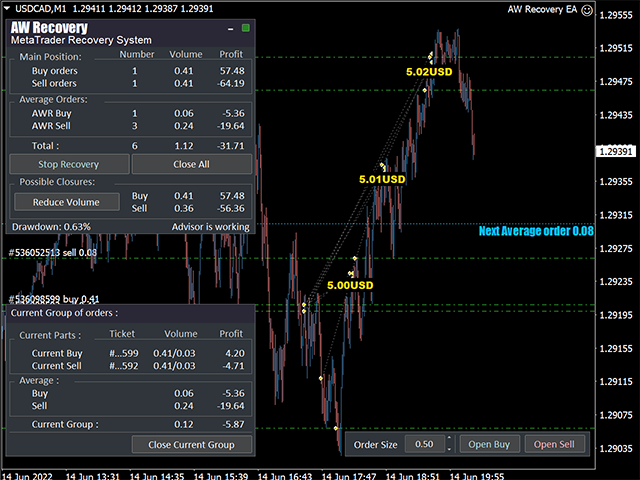
Know what you're running The EA is single-symbol: it works on the pair it's attached to and needs a losing position there to leave standby. Recovery trading uses averaging — make sure the account has the margin for it, and test in the strategy tester first.
The recovery sequence
- Takes the chart
Optionally disables other EAs — on this symbol or all symbols — so nothing interferes.
- Clears the decks
Resets TakeProfit and StopLoss levels and deletes pending orders (each action optional).
- Harvests existing profit
Optionally closes profitable orders and puts the profit against the loss immediately.
- Locks the loss
Aligns buy and sell volumes so the drawdown stops growing, whatever the market does next.
- Opens restoring orders
An averaging grid — with volume, step, multipliers and an optional trend filter under your control.
- Closes the position in parts
Profit covers a slice of the loss, the slice closes, and the position shrinks — starting from the orders you prioritized.
Set up in three steps
- Volumes
First averaging volume, grid step, and the ratio between averaging and closing volumes.
- Behavior
Trend filter, volume multiplier, and TakeProfit for the partial closes.
- Coexistence
Decide what happens to other EAs: keep them, or let AW Recovery disable them at launch.
The full walkthrough with tuning formulas lives in the manual: Setting up and testing AW Recovery EA.
Built for the ugly cases.
Position locking
Freezes the drawdown at launch so the loss can't grow while the recovery runs.
Partial closes
Splits the position into 6–8 parts and closes each one separately, easy or hard orders first.
Three trend filters
BullsBears candles, built-in AW Trend Predictor, or plain grids — averaging opens on your terms.
Works with other EAs
Recovers positions of any origin, and can pause the EA that opened them while it works.
Protection settings
Caps on volume, order count, spread and slippage; one-order-per-bar filtering; ECN commission mode.
Notifications
Alert, email and push when the recovery starts and when the position is fully recovered.
Three panels, full control.
Everything the EA does is visible and stoppable from the chart — live and in the strategy tester.
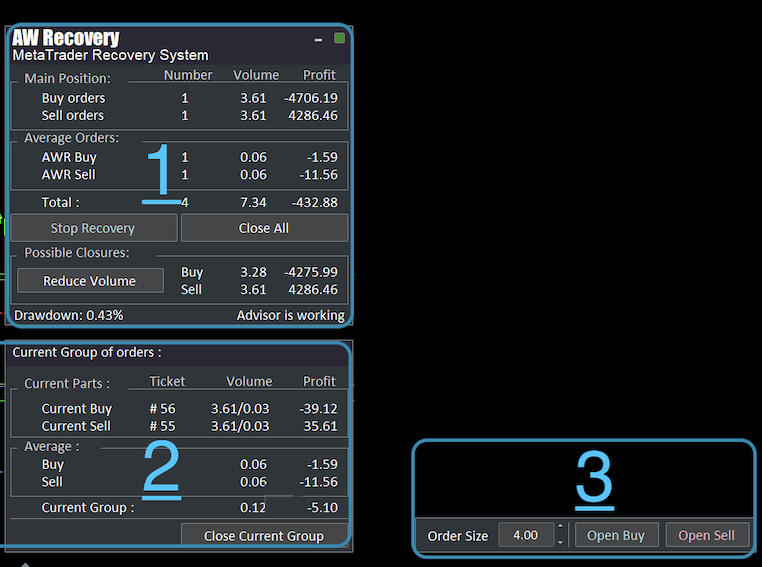
Main panel
Status, processed and restoring orders, total profit, drawdown — plus Stop Recovery, Close All and Reduce Volume.
Current group
The slice being closed right now: tickets, volumes, profit — and a button to close the group manually.
Order opening
Open locking or averaging orders by hand with adjustable volume — the tool for simulating drawdowns in the tester.