
 All products
 Experts
 Indicators
 Utilites
 Information for beginners
  Recomended Broker
AW CCI based EA


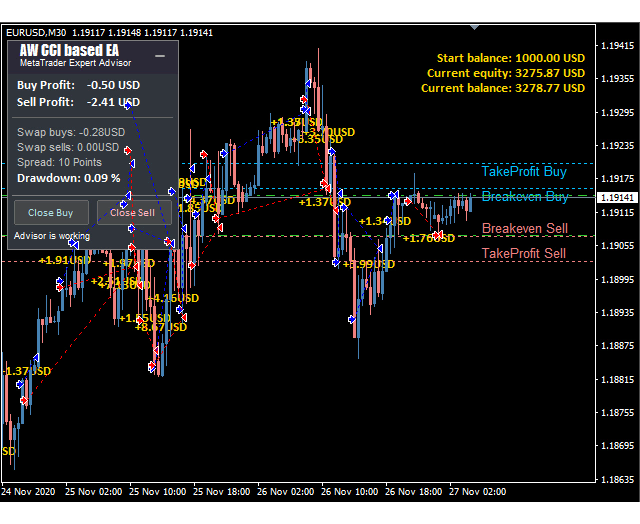


- List of product options
| CODE | Trading platform | Availability | Price | ||
|---|---|---|---|---|---|
|
|
$45.00 | ||||

|
61351A04B622C
|
$45.00 |
Please sign in so that we can notify you about a reply
Features
Expert Advisor Type:
- Hedging
- Level trading
- Martingale
Основные характеристики
Current version:
1.00
Operating system:
Windows 7/8/10
Published:
17 March 2021
Trading platform:
MetaTrader 4
Description
The Expert Advisor works on the signals of the classic CCI indicator. The system has many scenarios and flexible configuration. Uses averaging, the function of closing the first and last basket orders and the function of automatic lot calculation.
Advantages:
- Easy setup and intuitive panel interface
- Customizable CCI Indicator Signals
- Uses averaging if necessary
- Built-in automatic lot calculation
- Built-in system for closing the first and last basket orders
- Three types of notifications: push, email, alert
How the advisor works:
Buy signals:
- When the upper border of the indicator crosses from bottom to top
- when the lower border of the indicator crosses from bottom to top
Sell signals:
- When the upper border of the indicator crosses from top to bottom
- or when the lower border of the indicator is crossed from top to bottom
Trading strategy options:
- Buy and sell are allowed, the EA will make deals in both directions following the signals from the indicator
- Only purchases are allowed, bearish signals will be ignored, the EA will only make deals based on buy signals
- Only sells are allowed, bullish signals will be ignored by the advisor, the advisor will only make deals based on sell signals
Options for changing the lot:
- Manual lot change - lot adjustment in input settings, in manual mode
- Fixed lot volume - lot change, depending on the amount of funds on your deposit
Other possibilities:
- In the case of averaging, the function allows you to close the basket in parts. This will allow closing earlier than the whole basket.
- TakeProfit - Closing grid orders when the price passes a specified number of points
The graphical elements of the indicator are not displayed in the advisor!
Inputs
MAIN SETTINGS
- Size of the first order - Volume for opening the first order
- Enable Autolot calculation - Use automatic lot calculation
- Autolot deposit per 0.01 lots - Deposit volume for every 0.01 when using autolot
SIGNALS
- CCI Timeframe - Indicator timeframe
- CCI upper line - Setting the upper border of the indicator
- CCI lower line - Adjust the lower border of the indicator
- Period CCI - The higher the value, the fewer trades
- Applied price CCI - Price used for calculations
GRIDS SETTINGS
- Minimum step between average orders - Adjust the step between orders, measured in points
- Multiplier for average orders - Each subsequent order in the order grid will be larger than the previous one by a given coefficient
TAKE PROFIT SETTINGS
- Size of Virtual TakeProfit (In points) - Size virtual Take Profit . It is calculated for the current group of orders from the breakeven price
- Use overlap last and first orders - Use the overlap of the first order by the last
- Use overlap after that number of orders - Use overlap after the given number of open orders
PROTECTION SETTINGS
- Maximum slippage in points - The maximum allowable slippage in points for opening and closing orders
- Maximum spread in points - The maximum allowable spread for opening orders
- Maximum number of orders - The maximum allowed number of orders of the same type
- Maximum size of orders - The maximum volume for one order. Measured in lots
- Maximum 1 order per candle - Open only one order per candle
ADVISOR SETTINGS
- Orders Magic number - MagicNumber orders advisor
- Comments of the EA's orders - Comments for the EA's orders
- Allow to open OP_BUY orders - Allow the advisor to open orders of the OP_BUY type
- Allow to open OP_SELL orders - Allow the advisor to open orders of the OP_SELL type
- Allow to open new orders after close - Allow to send new orders after all orders are closed
- Show panel of advisor - Ability to show or hide the advisor panel
- Font size in panel - Adjust the font size on the panel
NOTIFICATIONS SETTINGS
- Send push notifications when closing orders - notifications to the mobile version of the terminal, when orders are closed
- Send mails when closing orders - Sending letters to an email address when closing orders
- Send alerts when closing orders - Sending pop-up notifications on the terminal when orders are closed